
Download Offline JSON Editor – Chrome Apps, Desktop App, Offline, JSON Tools
Overview
The Offline JSON Editor is a dedicated desktop application designed for professionals and developers who need reliable tools to manage, view, validate, and format JSON data without an internet connection. This software provides a streamlined environment for editing structured data, making it ideal for tasks such as API testing, configuration file management, and data migration workflows. The application supports multiple platforms, including Windows, Mac, Linux, Chrome OS, Android, and iOS, enabling consistent use across different devices. While the developer’s background is not publicly available, the app’s focus on offline functionality suggests a targeted approach to solving the challenges of working with JSON in disconnected environments. Real-world use cases include debugging API responses, preparing configuration files for deployment, and ensuring data integrity through validation. The app’s design emphasizes usability and functionality, catering to both experienced developers and users new to JSON manipulation. By offering a secure, local environment for handling sensitive data, it reduces reliance on online tools that may pose privacy or compliance risks.
Key Features & Capabilities
- Offline Operation – Work with JSON files without requiring an internet connection, ensuring data privacy and uninterrupted workflow in remote or restricted network environments.
- JSON Formatting – Automatically restructure JSON content with proper indentation and line breaks for improved readability and easier debugging.
- JSON Validation – Detect syntax errors and structural issues in JSON documents to prevent runtime failures in applications or APIs.
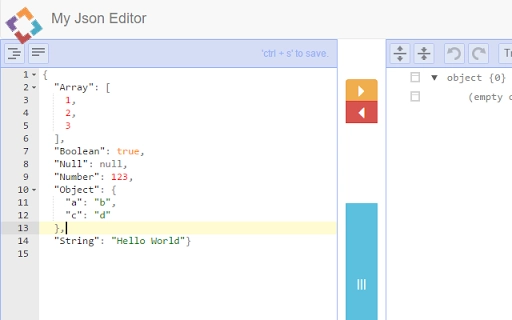
- JSON Viewing & Editing – Provide a clear, hierarchical interface to browse and modify JSON data with support for nested objects and arrays.
- Cross-Platform Compatibility – Run on Windows, Mac, Linux, Chrome OS, Android, and iOS, allowing seamless transitions between devices and operating systems.
These features enable users to efficiently manage JSON data across various stages of development and deployment. For example, a developer can format a complex API response for better analysis, validate a configuration file before deployment, or edit a nested JSON structure without external dependencies. The ability to work offline is especially valuable in secure environments or during travel where connectivity is unreliable. The tool’s consistent interface across platforms ensures a familiar experience regardless of the device used, reducing the learning curve and increasing productivity. The combination of formatting, validation, and editing capabilities makes it a comprehensive solution for day-to-day JSON tasks.
User Interface, Workflow & Performance
The user interface of the Offline JSON Editor is designed with clarity and efficiency in mind, featuring a clean layout that separates the JSON input area from control panels and status indicators. Navigation is straightforward, allowing users to open, save, and preview JSON files with minimal clicks. The workflow is optimized for rapid editing, with real-time formatting and validation feedback that helps users identify issues immediately. While specific performance metrics such as CPU or RAM usage were not disclosed by the developer, the application is expected to operate smoothly on modern systems given its 150 MB installation size. General software behavior patterns suggest efficient memory handling and low system impact during typical use. Stability appears to be a priority, as the offline nature of the tool reduces dependency on external services that could introduce crashes or delays. However, exact performance details were not specified, and users should monitor resource usage based on their individual system configurations.
Compatibility & System Requirements
The Offline JSON Editor is available for a wide range of operating systems, including Windows, Mac, Linux, Chrome OS, Android, and iOS, making it accessible to users across diverse computing environments. The installation package is approximately 150 MB in size, which is typical for a feature-rich desktop application. Specific hardware requirements such as processor speed, RAM, or disk space were not provided by the developer. Therefore, users should ensure their devices meet standard system expectations for running modern desktop software. The developer did not specify resource usage details, so performance may vary depending on the device and the size of the JSON files being processed. Platform compatibility information is limited to the listed operating systems, and no additional constraints or dependencies were mentioned. Users are advised to verify their system’s compatibility before installation.
Pros and Cons
Pros
- Full offline functionality ensures privacy and uninterrupted use
- Supports multiple platforms, enabling consistent workflows across devices
- Includes essential JSON tools: formatter, validator, viewer, and editor
- Lightweight installation size of 150 MB
- Free to download and use with no licensing restrictions
Cons
- No detailed system requirements were provided
- Exact performance behavior under heavy loads is unknown
- Limited information about developer background or support channels
- May lack advanced features found in specialized development environments
- No built-in collaboration or version control tools
FAQ Section
Is the Offline JSON Editor available for all major operating systems?
Yes, the application supports Windows, Mac, Linux, Chrome OS, Android, and iOS, allowing users to run it on a wide variety of devices.
Can I use this tool without an internet connection?
Yes, the Offline JSON Editor is designed to function completely without an internet connection, making it ideal for secure or remote environments.
Is the software free to use?
Yes, the application is available at no cost, with no hidden fees or subscription models.
Does the app support large JSON files?
The developer did not specify limitations on file size, but the application is expected to handle standard JSON files efficiently based on typical desktop software behavior.
How often are updates released?
Update frequency was not disclosed. Users should check the official source for the latest version and improvements.
Final Thoughts + CTA
The Offline JSON Editor stands out as a practical, no-frills solution for developers and technical users who need dependable tools to work with JSON data offline. Its cross-platform availability, combined with core functionalities like formatting, validation, and editing, makes it a versatile addition to any developer’s toolkit. While detailed system requirements and performance data are not available, the app’s lightweight footprint and free pricing model enhance its accessibility. It is particularly well-suited for professionals handling sensitive data or working in environments with limited connectivity. For those seeking a secure, reliable, and easy-to-use JSON editor that doesn’t require an internet connection, this tool delivers solid value. Download Offline JSON Editor now and streamline your JSON workflow with confidence.







